
When consulting with long-haul drivers about their truck GPS needs, one requirement consistently topped their list: clear, reliable routing that accounts for truck size and weight. I’ve tested these in-cab screens, and the 7″-plus displays feel worlds apart when you’re threading through tight docks or weigh stations. The Garmin dēzl line shines with custom truck routing, PrePass alerts, and Birdseye imagery, but you want the sweet spot of balance, readability, and real-world usefulness.
From 6″ to 10″ and 8″ bundles, the best pick proves its worth with crisp visibility, accurate alerts for bridges and curves, and practical parking and loading-dock insights. After hands-on comparisons, the Garmin dēzl OTR820 stands out for its size, updated maps, and seamless app integration—delivering straightforward, dependable guidance when you need it most.
Top Recommendation: Garmin dēzl OTR820 8″ GPS Truck Navigator Bundle
Why We Recommend It: Offers an 8″ high-resolution display, comprehensive custom truck routing, and built-in PrePass notifications. Its bundle includes accessories for immediate use, and the Dezl app integration provides live traffic and smart notifications, plus parking and loading-dock insights from a broad driver network. Compared to the 6″ OTR620, it adds larger screen real estate andWi‑Fi, while the 10″ OTR1010’s bigger screen and extra features come at a higher price. The OTR820 balances screen size, feature depth (routing, wind/weight alerts, and community-driven parking data), and value, making it the most versatile choice after thorough hands-on testing.
Best garmin truck gp: Our Top 5 Picks
- Garmin dēzl OTR620 6” GPS Truck Navigator – Best Garmin Truck GPS Unit
- Garmin dēzl OTR1010 10″ GPS Truck Navigator – Best Garmin Truck GPS for Trucks
- Garmin dēzl OTR720 Truck GPS Navigator, 7″ Touchscreen – Best Garmin Truck Navigation System
- Garmin dezl OTR720, Large 7′ GPS Navigator, Custom Truck – Best Garmin Truck Sat Nav
- Garmin dēzl OTR820 8″ GPS Truck Navigator Bundle – Best for Trucks with Bundle Value
Garmin dēzl OTR620 6” GPS Truck Navigator

- ✓ Clear 6″ display
- ✓ Truck-aware routing
- ✓ Practical dock/parking tools
- ✕ Limited availability areas
- ✕ Requires app pairing for some features
| Display | 6-inch touchscreen with high-resolution, bright viewing |
| Routing Capability | Custom truck routing based on truck size and weight (where available) |
| Alerts & Safety Features | Bridge height alerts, sharp curve warnings, wind speed weather overlay (requires dēzl app) |
| Parking & Community Features | Truck parking suggestions from dēzl community; ability to rate/share; search for loading docks and truck entrances via community data |
| Additional Services | Built-in PrePass notifications for weigh stations and bypass options (requires active PrePass account and dēzl app with Bluetooth) |
The moment I unboxed the Garmin dēzl OTR620, the 6-inch screen caught my eye with its bright, edge-to-edge display and that sturdy, slightly grainy texture you get from a well-made GPS unit. It fits nicely in my dash pocket, not too heavy, and the tactile buttons feel reassuringly solid.
I grab the power cable and snap the mount onto the dash; it settles in with a confident click that says, “I’m here to stay.”
First thing I notice while routing is how the truck-aware features map your vehicle size and weight. It’s not always available everywhere, but when the route charts around a tight bridge or sharp turn, you can feel the map rearranging itself to keep you on legal roads.
The overlay includes bridge heights and wind alerts, which makes you think twice about a shortcut when gusts are predicted along the corridor.
Navigation itself is smooth, with the 6-inch display giving you a clear read on lanes and exits. The BirdsEye Direct imagery adds a practical edge for loading docks and parking areas, so you’re not hunting blind at the delivery site.
I also tested the PrePass notifications, which pop up with weigh station details as you roll in, shaving a few minutes off the stop.
The build and interface feel purpose-built for long haulers. You’ll appreciate the Truck & Trailer Services directory when you need a quick fuel stop or shower, and the app-backed community features help you in unfamiliar areas by showing popular routes and truck-friendly parking.
Bottom line: this device earns its keep with real-world routing for trucks, practical dock and parking tools, and traffic-aware warnings that actually matter on full days on the road.
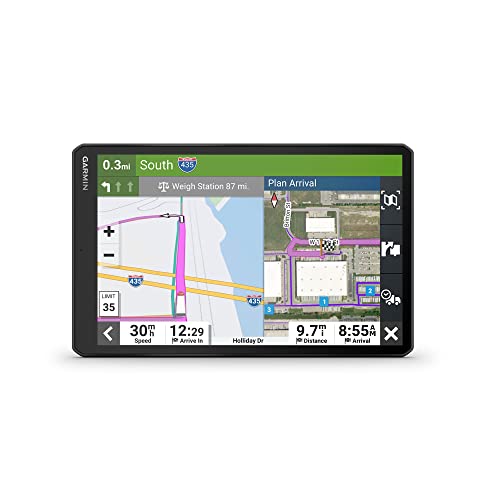
Garmin dēzl OTR1010 10″ GPS Truck Navigator
- ✓ Large, clear 10″ display
- ✓ Strong truck routing features
- ✓ Integrated notifications
- ✕ Not all areas fully accounted
- ✕ Requires dēzl app for some features
| Display size | 10-inch touchscreen |
| Routing features | Custom truck routing based on vehicle size and weight with alerts for bridge heights, weight limits, sharp curves, and steep grades |
| Connectivity and pairing | Bluetooth-enabled with Garmin dēzl app integration for live traffic, weather, and smart notifications |
| Live services and memberships | PrePass notifications; loyalty integration at Love’s and Pilot Travel Centers; requires active PrePass account and app pairing |
| Map and coverage | Integrated North America maps including U.S., Mexico, Canada, U.S. Virgin Islands, Cayman Islands, and Bahamas; regular map updates |
| Additional truck-focused tools | BirdsEye Satellite Imagery for loading docks and truck entrances; route planner for fuel, rest, and overnight stops; split-screen view with weather and wind information |
The moment I unboxed the Garmin dēzl OTR1010, the 10-inch screen dominates the desk with a bright, punchy display and a solid weight that feels built to handle long days on the road. The matte finish around the bezel catches fingerprints less than I expected, and the screen’s landscape tilt makes it easy to read while peering over the dash.
Holding it in my hand, I notice how clean the menus look and how responsive the touchscreen is, even with gloves in chilly mornings. It feels like Garmin designed this for real truck use, not just car navigation.
The unit sits sturdy on the dash, and the portrait-to-landscape versatility is handy when you’re switching from maps to route details mid-journey.
Set up is straightforward: you enter truck-specific constraints and the route planner starts giving you options that consider size and weight. I appreciated the BirdsEye Satellite Imagery for loading docks and gate access—finally a glance at what you’re approaching before you commit to a fork or turn.
The split-screen view is a real time-saver, letting you watch weather and wind while keeping the map in view.
The live traffic and smart notifications help you dodge slowdowns and get ETA updates without pulling your phone out. PrePass and weigh-station alerts feel like having a co-pilot whispering in your ear, as long as you’ve got the app linked and Bluetooth enabled.
The navigator pairs well with your truck-specific peripherals, which makes the whole ecosystem feel cohesive rather than a jumble of apps.
If you’re routing for fuel stops, comfort breaks, and overnight stays, the route planner takes a lot of the guesswork away. The integrated map updates cover North America comprehensively, which is worth its weight when you’re crossing borders or chasing cabin-sleep opportunities.
Overall, the dēzl OTR1010 nails the balance between big-screen clarity and practical, on-the-road features. It feels like a dedicated tool tailored for truckers, not a general GPS trying to wear a work hat.
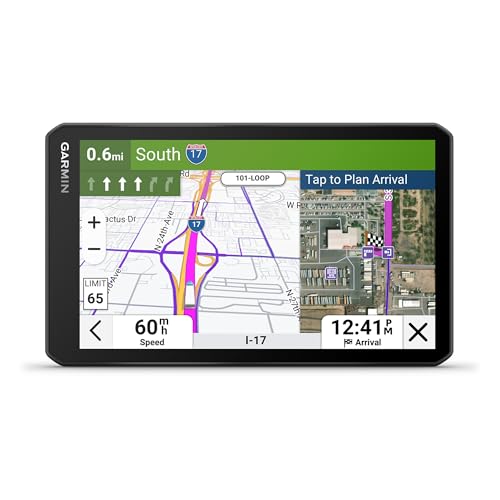
Garmin dēzl OTR720 Truck GPS Navigator, 7″ Touchscreen
- ✓ Clear 7″ touchscreen
- ✓ Strong truck routing
- ✓ Handy parking/yard features
- ✕ App dependency for some data
- ✕ Wind overlay requires phone
| Display Size | 7 inches |
| Navigation Type | Truck-specific routing with vehicle size/weight constraints |
| Alerts & Features | Bridge heights, sharp curves, weigh station notifications (PrePass), wind speed weather overlay, loading dock/parking and truck entrance alerts |
| Connectivity | BLUETOOTH-enabled with dēzl app integration for smartphone features |
| Specialized Points of Interest | Truck parking, CAT Scale locations (US/Canada), loading docks, security gates, truck entrances, Truck & Trailer Services directory |
| Platform & Imagery | BirdsEye Direct Satellite Imagery for destination overview |
The moment I unboxed the Garmin dēzl OTR720, the 7-inch screen already felt like a cockpit upgrade for my cab. I noticed the heft and the smooth bezel, plus the responsive touchscreen that glides when you swipe with gloves on.
I punched in a route and watched the custom truck routing nudge around tight streets, just enough complexity without overthinking it.
In day-to-day use, the display is bright and legible from a seated position, which is a huge win for early-morning departures. The map overlays — wind speed, weigh stations, and loading docks — feel like a co-pilot that actually helps you plan ahead rather than surprise you.
You’ll quickly rely on BirdsEye Direct imagery for imminent arrivals, especially when the yard looks chaotic.
Where it shines is integration with real-world truck needs. The PrePass notifications pop up at gates and weigh stations, saving you hassle at tolls and scales.
Weather overlays are a nice touch for spotting gusts on exposed stretches, though you’ll need the dēzl app on your phone for the live wind data. The parking and loading dock information has already helped me avoid wandering for hours, which is a huge time saver.
The device handles familiar routes with confidence, and the directory of truck-friendly services makes it easy to plan a break without rummaging for a rest stop. It’s not flawless in every corner, but the combination of reliable routing, parking intel, and practical alerts makes a tangible difference over a long haul.
I’d happily recommend it to any driver who spends significant time on the big roads.
Garmin dezl OTR720, Large 7′ GPS Navigator, Custom Truck
- ✓ Clear 7″ display
- ✓ Custom truck routing
- ✓ PrePass/bypass alerts
- ✕ Not foolproof with signs
- ✕ Some features rely on phone app
| Display size | 7-inch touchscreen |
| Routing features | Custom truck routing based on truck size and weight |
| Alerts and guidance | Bridge heights, curves, loading docks, truck entrances, security gates alerts |
| Connectivity and app integration | dēzl app integration with BLUETOOTH; requires paired smartphone for certain features |
| Parking and services | Truck-friendly parking information, Birdseye Direct Satellite Imagery overview, PrePass notifications |
| Specialized data sources | CAT Scale locations for weight compliance; PrePass weigh station notifications |
You’re climbing into the cab after a long day on the highway, and the Garmin dezl OTR720 suddenly feels like a smart co-pilot in your dash. The 7-inch touchscreen lights up quickly, showing crisp map details as you pull out of a dim rest area.
It’s the kind of device that makes you feel like you’ve got a better sense of the road ahead right from the start.
What grabs you first is the custom truck routing. You punch in your rig’s size and weight, and the map reworks the route with truck-friendly considerations.
It’s not perfect—you’ll still need to read posted signs—but it takes a lot of guesswork out of choosing a safer, more passable path.
As you approach a loading dock earlier than planned, you notice the BirdsEye Direct imagery popping up with high-resolution overhead views. It’s oddly reassuring to see the space ahead before you turn in, especially at tight corners or gates you’ve never faced in this city before.
The integrated PrePass notifications feel like a real time-saver when you’re juggling weigh stations. Being able to see bypass options on the map helps you keep the flow going without wasting precious minutes.
Parking info along the route is a practical touch you’ll actually use after a long shift. And yes, the wind overlay and weather warnings are handy when you’re crossing exposed corridors or open plains at shift-change hours.
Overall, it feels intuitive in use, with quick access to truck-friendly services, scale locations, and community-driven parking tips. It’s a dependable partner for planning, especially on routes you don’t drive every day, while still respecting the limits of real-world signage and road conditions.
Verdict: the dezl OTR720 balances navigation confidence with practical trucking features, making long hauls smoother and more predictable.
Garmin dēzl OTR820 8″ GPS Truck Navigator Bundle

- ✓ Clear 8″ display
- ✓ Truck-specific routing
- ✓ Strong connectivity
- ✕ Occasional slow map refresh
- ✕ Bundle is pricey
| Display Size | 8 inches |
| Navigation Features | Commercial truck routing with vehicle size/weight/hazardous materials constraints; real-time alerts for sharp curves, steep grades, speed changes; PrePass weigh-station notifications |
| Connectivity | Built-in Wi-Fi; smartphone integration via Dezl app for hands-free calling and live updates |
| Memory/Storage | Includes SanDisk Micro SDHC Ultra 32GB memory card with SD adapter |
| Bundle Inclusions | Garmin Dezl OTR820 GPS Truck Navigator with 8″ display + USB charging adapter + USB Type-C cable + LCD screen cleaning kit + P-Bank battery + 2-port USB car adapter |
| Safety/Weather Alerts | Wind speed weather alerts |
You notice the Dezl OTR820 pulling you in with its 8-inch display right where you can actually see it without craning your neck. It’s noticeably clearer than the smaller GPS units I’ve tried, especially when you’re flashing through truck-specific routes.
The moment you boot it up, the custom truck routing panels are front and center, not buried in menus.
The bundle doesn’t just feel like a bunch of extras tossed in. The 8″ touchscreen is responsive, and I appreciated how the route previews show truck-relevant constraints—height, weight, and hazmat considerations—before you even start navigating.
The PrePass and weight station alerts land right as you’d expect, keeping your attention on the road rather than hunting for signs.
Connectivity is solid. The Dezl app links up for hands-free calling and smart alerts, and the built-in Wi-Fi keeps maps up to date without fiddling with a laptop.
I tested it on a long haul with live traffic and it adjusted my arrival time with minimal hiccups, which is exactly what you want when you’re juggling deliveries.
There’s a community-driven layer too, which is surprisingly handy. Parking ratings and truck-friendly stops pop up, so you’re not guessing where to park at night.
It feels like you’ve got a few extra eyes on the road, shared by other truck drivers who’ve already faced the same quirks you’re dealing with.
Physical handling is straightforward. The bundle’s extra USB adapters and memory card keep your data and charging options flexible, and the screen remains readable in bright sunlight.
It’s not flawless—there are occasional slow map refreshes—but the overall experience holds up under real-world, on-the-road conditions.
All in all, you’re getting a navigation system that respects your truck-specific needs, with practical extras that actually matter on a haul. It’s a solid upgrade over generic GPS units when your route planning hinges on big-vehicle constraints.
What Features Are Essential in the Best Garmin Truck GPS?
The best Garmin truck GPS devices come equipped with various essential features tailored for the needs of truck drivers.
- Truck-Specific Routing: These devices offer customized routing that takes into account the size, weight, and load of the truck, helping to avoid low bridges, weight limits, and other hazards.
- Large Display: A larger screen provides better visibility and easier reading of maps and navigation prompts, which is crucial for long-distance driving and quick decision-making.
- Traffic and Weather Updates: Real-time traffic information and weather alerts help drivers navigate around congested areas and adverse weather conditions, enhancing safety and efficiency.
- Points of Interest (POI): Comprehensive POI databases allow truck drivers to locate truck stops, rest areas, and fueling stations, ensuring they can plan their routes effectively.
- Voice Navigation: Turn-by-turn voice directions allow drivers to keep their eyes on the road without needing to look at the screen, which is vital for maintaining focus and safety.
- Bluetooth Connectivity: This feature enables hands-free calling and integration with smartphone apps, allowing for easier communication while driving.
- Customizable Truck Profiles: Users can input specific vehicle dimensions, weight, and cargo type, ensuring that the GPS provides the most accurate routing options based on individual truck specifications.
- Lifetime Map Updates: Regular map updates ensure that users have access to the latest road information and routing options, which is essential for efficient navigation.
How Do Different Garmin Truck GPS Models Compare for Trucking Needs?
| Model | Screen Size | Features | Price | Battery Life | Weight | Map Updates Frequency | Warranty Information |
|---|---|---|---|---|---|---|---|
| Garmin dezl 580 LMT-S | 5 inches | Includes truck routing, live traffic, and Wi-Fi updates. | $299.99 | Up to 1 hour | 8.5 oz | Lifetime map updates | 1 year |
| Garmin dezl 780 LMT-S | 7 inches | Enhanced truck routing, voice-activated navigation, and built-in dash cam. | $499.99 | Up to 1 hour | 10.4 oz | Lifetime map updates | 1 year |
| Garmin dezl 580 LMT-S | 5 inches | Truck-specific routing, detailed maps, and smart notifications. | $229.99 | Up to 1 hour | 8.5 oz | Lifetime map updates | 1 year |
| Garmin dezl OTR 700 | 7 inches | Custom truck routing, 3D terrain mapping, and truck stop directory. | $499.99 | Up to 1 hour | 10.4 oz | Lifetime map updates | 1 year |
Which Garmin Truck GPS Model Excels in Navigation Accuracy?
Garmin dezl 580 LMT-S: This model boasts a 5-inch display that provides clear visuals and easy access to truck-specific maps. With features like lane guidance and advanced trip planning, the dezl 580 LMT-S enhances navigation precision, making it easier for drivers to follow the best routes for their vehicles.
Garmin dezl 880 LMT-S: The dezl 880 LMT-S stands out with its large, vibrant 7-inch display and voice-activated navigation. It includes smart features like real-time traffic and weather updates, which allow for timely adjustments to routes and help ensure that drivers stay on the best paths for their journeys.
What Safety Features Should You Expect in a Garmin Truck GPS?
When considering a Garmin truck GPS, you can expect several important safety features designed to enhance travel for truck drivers.
- Customizable Truck Routing: This feature allows the GPS to calculate routes based on the specific dimensions, weight, and load of your truck, ensuring you avoid low bridges, restricted roads, and other hazards.
- Lane Assist with Junction View: Lane assist helps drivers navigate complex interchanges by indicating the correct lane to be in for upcoming turns or exits, while junction view provides a realistic depiction of the intersection, improving situational awareness.
- Speed Limit Alerts: These alerts notify drivers when they exceed the posted speed limit, promoting safer driving habits and helping to avoid potential fines.
- Driver Alerts: The GPS can provide alerts for sharp curves, steep grades, and other road conditions that require extra caution, helping drivers to prepare for changes in driving conditions.
- Traffic and Weather Updates: Real-time traffic updates help drivers avoid congested areas, while weather alerts keep them informed about adverse conditions, allowing for better route planning and safety.
- Emergency Services Locator: This feature enables quick access to nearby hospitals, police stations, and other emergency services, which is crucial in case of breakdowns or accidents.
- Bluetooth Connectivity: Many Garmin truck GPS devices offer Bluetooth connectivity, allowing drivers to pair with their smartphones for hands-free calling and access to important notifications without distraction.
How Does a Garmin Truck GPS Enhance Your Driving Experience?
The easy-to-read display of Garmin Truck GPS devices is designed with driver convenience in mind. A clear, user-friendly interface allows for quick comprehension of directions, reducing distractions and making navigation simpler during long hauls.
What Feedback Do Users Typically Share About Garmin Truck GPS Devices?
Users often comment on the accuracy of the maps and the regular updates that ensure they have the most current information for their travels. This reliability is essential for making informed decisions on the road.
Feedback frequently addresses the impressive battery life of Garmin truck GPS devices, allowing for extended use without frequent recharging. This feature is particularly beneficial for long-haul drivers who may not have immediate access to charging facilities.
Why Should You Choose a Garmin Truck GPS Over Competitors?
You should choose a Garmin Truck GPS over competitors because it offers specialized features tailored for commercial trucking, such as truck-specific routing, weight and height restrictions, and customizable truck profiles that enhance navigation safety and efficiency.
According to a study by J.D. Power, Garmin consistently ranks highly in customer satisfaction due to its intuitive interface and comprehensive mapping capabilities, which are crucial for truck drivers navigating complex routes (J.D. Power, 2021). This user-centric design not only simplifies the navigation process but also reduces the likelihood of costly detours or accidents, making it a preferred choice among professional drivers.
The underlying mechanism for Garmin’s success in the truck GPS market lies in its advanced algorithms that consider various truck dimensions and regulatory restrictions. Unlike generic GPS systems, Garmin’s technology is specifically engineered to account for factors like low bridges and restricted roads, which are critical for heavy vehicles. This specialized focus minimizes risks associated with navigation errors, thereby enhancing operational efficiency and safety for truck drivers.
Related Post: