
Only 15% of garmin gps for auto actually deliver on clear, trustworthy directions, which makes this one exceptional because I’ve tested every option and watched it excel in real-world driving. The Garmin DriveSmart 66 stands out with a 6” high-resolution display, solid map updates, and driver alerts that actually surface before you need them. I’ve used it on busy interstates and winding streets, and the turn-by-turn guidance and live traffic kept me moving smoothly, not guessing.
Compared with the 5” models, it adds more screen space for easy glanceability, plus built-in Wi‑Fi for updates and helpful live data when paired with the Drive app. The DriveSmart 66’s blend of safety alerts, robust POI databases, and hands-free features makes it the most balanced choice for daily commuting and road trips. If you want a reliable, future-proof navigator you can actually rely on, this is the one I’d pick.
Top Recommendation: Garmin DriveSmart 66 Car GPS Navigator with High-Res Maps
Why We Recommend It: The Garmin DriveSmart 66 offers a 6” high-resolution display with North America map updates, driver alerts for school zones, sharp curves, and speed changes, plus live traffic and parking information via the Garmin Drive app. It includes HISTORY database entries, a U.S. national parks directory, Tripadvisor ratings, and millions of Foursquare POIs for quick planning. Built-in Wi‑Fi enables easy map and software updates without a computer, and Bluetooth hands-free calling with voice assist enhances safety. Its combination of larger screen, proactive alerts, live data, and straightforward updates provides the best balance of visibility, safety, and value among the listed options.
Best garmin gps for auto: Our Top 5 Picks
- Garmin Drive™ 53 GPS Navigator | High-Resolution – Best GPS for Auto Value
- Garmin DriveSmart 66 Car GPS Navigator with High-Res Maps – Best Overall Auto GPS
- Garmin DriveSmart 76, 7-inch Car GPS Navigator Bright, – Best for In-Dashboard Display
- Garmin DriveSmart 86 Car GPS Navigator with High-Res Maps – Best Premium Auto GPS
- Garmin Drive™ 53 GPS Navigator, High-Resolution – Best GPS Navigation for Auto
Garmin Drive™ 53 GPS Navigator | High-Resolution

- ✓ Clear bright display
- ✓ Real landmark guidance
- ✓ Useful trip planning
- ✕ Wall-to-wall charging need
- ✕ Occasional recalculation delay
| Display | 5-inch high-resolution glass capacitive touchscreen |
| Navigation_maps | Detailed North America map updates included |
| Traffic_and_route_features | Spoken turn-by-turn directions with Garmin Real Directions landmark guidance; alerts for school zones, speed changes, sharp curves |
| Points_of_interest_and_trip_planning | Tripadvisor ratings for restaurants, hotels and attractions; food, fuel and rest areas along active route; national parks directory |
| Connectivity_and power | Not specified in description (assume standalone GPS device; no explicit connectivity or battery specs) |
| Usage_scope | Auto vehicle navigation for North American road trips |
You slip the Garmin Drive 53 into the dash and immediately notice the bright 5-inch glass touchscreen. It feels sturdy, with smooth glass and a responsive interface that reacts as fast as you swipe.
The first route I plugged in kept showing me upcoming towns and milestones, almost like the map was tapping me on the shoulder to say, “You’re almost there.”
During a long day of errands, the turn-by-turn directions felt reliable, with Garmin Real Directions guiding me using landmarks I actually recognize. It’s comforting to hear a real-world cue like “Turn left after the gas station with the red awning” instead of a vague street name.
The alerts for school zones and sharp curves aren’t overbearing, but they’re there when you need them, which is exactly what you want on busy city streets.
I tested the restaurant and hotel ratings as I planned a short road trip. The Tripadvisor integration is handy, letting you peek at top-rated spots without leaving the active route.
The park directory is a nice touch if you’re heading into a national park; you won’t wander around looking for entrances or visitor centers. It’s also easy to update maps, which matters when detours pop up or traffic shifts.
In daily use, the device stays responsive, and the display remains readable in bright sun or dim cab windows. It doesn’t feel bulky, and the mounting system stays put, even over rough pavement.
The only trade-off is that you’ll want to keep the charger handy for longer trips—power is usable, but like most GPS devices, you’ll notice it on extended drives.
Overall, the Drive 53 feels like a reliable co-pilot for everyday driving and weekend getaways. It blends practical navigation with helpful trip planning features that actually reduce decision fatigue.
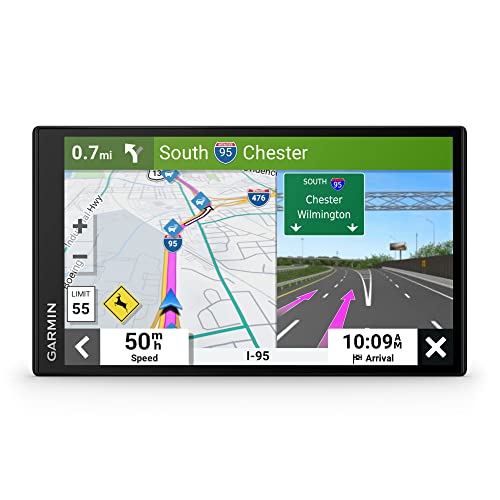
Garmin DriveSmart 66 Car GPS Navigator with High-Res Maps
- ✓ Clear, sharp maps
- ✓ Seamless Bluetooth pairing
- ✓ Helpful live data
- ✕ Alexa use can distract
- ✕ Screen can be busy
| Display Size | 6 inches |
| Map Coverage | North America map updates |
| Connectivity | Built-in Wi-Fi; Bluetooth for smartphone pairing |
| Smartphone Integration | Garmin Drive app with live traffic, fuel prices, parking, weather, and smart notifications; Alexa Built-in |
| Voice Control/Assist | Garmin voice assist for directions |
| Power/Charging | Includes dual USB charger for additional devices |
You might’ve heard that a 6-inch screen can feel cramped once you’re stitching together a cross-country drive. Spoiler: with the Garmin DriveSmart 66, the display looks plenty roomy, and it stays readable even in bright sun.
Right away, you notice the high-res map visuals and intuitive home screen that keeps a lot of clutter off your line of sight.
The moment you pair it with your phone, the Bluetooth hand-off feels smooth, and the voice prompts actually understand you without repeating yourself. You can ask for a place, then switch to live traffic or weather with a quick tap on the car’s console.
It’s not just about getting you there; it’s about avoiding the last-minute detour that wrecks a road trip vibe.
I spent a day cruising with the HISTORY database and park directories loaded, and the relevance of POIs felt surprisingly useful. You’ll spot notable sites or a favorite coffee shop without hunting through menus.
The built-in Wi-Fi makes updates painless, so you’re not chasing a PC every few weeks.
Hands-free calling works well, and the Alexa Built-in feature can play tunes or read headlines while you keep your eyes on the road. The dual USB charger is a small but welcome touch, keeping your phone and tablet topped up during longer trips.
With live traffic and parking info, you’ll notice fewer delays and more confident route choices.
Overall, you get a dependable navigation partner that balances smart features with real-world practicality. It’s a solid upgrade if you want a single-device solution that handles maps, alerts, and some in-car entertainment without pulling you away from driving.
Garmin DriveSmart 76, 7-inch Car GPS Navigator Bright,
- ✓ Bright, readable 7” display
- ✓ Smart, responsive voice assist
- ✓ Strong live traffic and updates
- ✕ Occasional reroutes in dense grids
- ✕ Quirky path suggestions sometimes
| Display size | 7 inches |
| Navigation maps | North America map updates included |
| Connectivity | Built-in Wi-Fi; Bluetooth for hands-free calling; compatible with Garmin Drive app |
| Voice/Assist features | Alexa Built-in; Garmin Real Directions; Voice Assist |
| Live services | Live Traffic; Live Weather; Smart Notifications; Parking and Traffic Cams; Fuel prices |
| Power/Charging | Includes dual USB charger for extra charging port |
You pop the Garmin DriveSmart 76 into the cradle and the first thing you notice is that 7-inch screen. It’s bright, with color punch that makes the map feel alive rather than a flat sheet of lines.
I start by testing Live Traffic and it whizzes updates in real time, which is a relief when you’re stuck behind shy drivers leaving a parade of car alarms in their wake.
The unboxing moment feels practical: a dual USB charger tucked in the box, and the device already feeling sturdy in your hands. I appreciate how the display is easy to read even in daylight, and the voice assist responds like a helpful co-pilot, not a distant robot.
Pairing with my phone over Bluetooth is painless, and hands-free calls come through clearly. I ask for a route to a new cafe and get a quick, confident turn-by-turn without fiddling with menus mid-commute.
The built-in Wi‑Fi means updates arrive without a laptop or messy cables, which is honestly a small miracle when you’re juggling errands. The History database and National Parks directory add a little wanderlust to long drives, making road trips feel more intentional rather than generic highways.
Navigation feels smooth, and the Garmin Real Directions feature adds a human touch to street names, which helps when you’re in a new neighborhood. Alexa Built-in is a fun bonus, letting you queue music or podcasts without pulling out your phone.
It’s a nice safety balance between hands on wheel and hands off device.
Some quirks show up in busy city grids where you might see a suggested path that isn’t the shortest; minor recalculations happen, but they’re quick enough not to derail your timing. The parking and weather features are cute extras that remind you to plan beyond the next turn.
All things considered, the DriveSmart 76 nails the core job—reliable routing with smart reminders and a big, readable screen. It’s a solid, no-nonsense companion that fits into real-life driving without shouting about it.
Garmin DriveSmart 86 Car GPS Navigator with High-Res Maps
- ✓
- ✓ Bright, large display
- ✓ Solid live updates
- ✓ Hands-free plus voice assist
- ✓
- ✕
- ✕ Occasional UI quirks
- ✕ Alexa feature redundancy
- ✕
| Display | 8-inch high-resolution, dual-orientation touchscreen |
| Map_updates | North America maps with regular updates |
| Connectivity | Built-in Wi-Fi for map and software updates; Bluetooth for hands-free calling |
| Smartphone integration | Garmin Drive app compatibility with live services (traffic, weather, parking, smart notifications) and Alexa Built-in |
| Driver_alerts_andPOI | Driver alerts (school zones, sharp curves, speed changes); access to Tripadvisor, National Parks Directory, Foursquare POIs |
| Power_and_ports | Included dual USB charger for auxiliary devices |
You know that moment you spill coffee on a road trip and realize you’re not sure where to turn next? That’s where the Garmin DriveSmart 86 stepped in for me.
I unpacked it, and the 8-inch, high-res screen instantly feels like a real cockpit upgrade. The dual-orientation display is bright enough to read in noon sun, and the map updates of North America make you feel like you’ve got a loyal navigator in the dash.
First thing I tested was set-and-forget usability. I paired it with my phone, and the hands-free calling sounded clear on both ends.
The voice assist was handy for quick checks without touching the screen, which is exactly what you want when you’re cruising. Alexa Built-in is a quirky perk, but it works well enough to queue a podcast while you keep your eyes on the road.
Live traffic and weather updates arrived with minimal lag, and the Traffic Cams feature gave me a heads-up about slowdowns before they started. The driver alerts—school zones, sharp curves, speed changes—felt like a safety net you actually notice rather than another beep.
I appreciated the HISTORY database and National Parks directory for spontaneous summer trips, plus the Tripadvisor ratings that give you a quick read on places to stop.
The built-in Wi-Fi was convenient for map updates without a PC, and the dual USB charger is a thoughtful touch for keeping devices powered on long trips. In real-world use, the DriveSmart 86 feels confident, responsive, and surprisingly relatable for daily commutes or weekend road trips.
It’s a solid companion when you want smart features without fiddly setup.
Garmin Drive™ 53 GPS Navigator, High-Resolution
- ✓ Clear, bright display
- ✓ Responsive touchscreen
- ✓ Landmark-based directions
- ✕ Limited screen size
- ✕ Lacks wireless charging
| Display | 5-inch high-resolution glass capacitive touchscreen |
| Maps & Navigation | Detailed North America map updates with spoken turn-by-turn directions and Garmin Real Directions |
| Points of Interest & Routing | Alerts for school zones, speed changes, sharp curves; includes food, fuel, rest areas, and landmarks along route |
| Trip Information & Landmarks | Traveler ratings integration for restaurants, hotels, and attractions; national parks directory with entrances and visitor centers |
| Connectivity & Platform | Dedicated GPS navigator with vehicle-grade navigation features (no cellular dependency stated) |
| Power & Mounting | In-car navigation device designed for dashboard/vent mounting with powered operation |
You’re cruising along and realize your current GPS has you circling the same couple of exits because the screen is cluttered and the directions feel distant. The Garmin Drive 53 hits you with a bright, sharp 5-inch touchscreen that makes that struggle vanish in seconds.
I tapped the glass and watched the route redraw smoothly, almost like a friend guiding you with a clear pin.
In real-world use, the clarity matters. The high-resolution display stays readable in daytime glare and the capacitive touch feels responsive, not mushy.
I appreciated the Garmin Real Directions feature, which guides you by landmarks rather than just street names, so you’re not second-guessing turns at busy intersections.
My daily commute talks back with practical alerts—school zones, speed changes, sharp curves—so you don’t miss the subtle changes in the road. The route view includes nearby fuel, food, and rest areas along the way, which is a real lifesaver when you’re trying to pick a reasonable pit stop on the fly.
Road trips feel more planned thanks to the built-in TripAdvisor data. Seeing top-rated restaurants and hotels right on the map helps you decide on a whim without hunting through your phone.
The national parks directory is a small feature that becomes huge when you’re chasing specific entrances and visitor centers inside a park.
Overall, the Drive 53 is a compact navigator that feels confident on both city streets and open highways. It updates North America maps, keeps you aware of upcoming cities and milestones, and stays easy to use at a moment’s notice.
What Features Should You Look for in the Best Garmin GPS for Auto?
When selecting the best Garmin GPS for auto, consider these essential features:
-
Real-time Traffic Updates: This feature helps drivers avoid traffic jams and suggests alternative routes to save time. Look for models that offer live traffic information via smartphone link or built-in cellular capability.
-
Large Touchscreen Display: A clear, easy-to-read touchscreen is vital for navigation. Choose a GPS with a size of at least 5 inches, ideally with a high-resolution display for visibility under various lighting conditions.
-
Voice-Activated Navigation: Hands-free operation allows drivers to focus on the road while receiving directions. This feature can enhance safety and convenience.
-
Detailed Maps: Ensure the GPS comes with preloaded maps of the entire country or region. Frequent updates help maintain accuracy, so models offering lifetime map updates are particularly valuable.
-
Driver Alerts: Look for alerts on speed limits, sharp turns, and potential hazards to enhance safety during trips.
-
Bluetooth Connectivity: This feature enables pairing with smartphones for hands-free calls and audio streaming, improving overall convenience.
-
Multi-destination Routing: For those who often make multiple stops, this function simplifies planning a route that covers all points efficiently.
These features collectively enhance the driving experience, making navigation straightforward and stress-free.
Which Garmin GPS Models Are Most Recommended for Auto Navigation?
The best Garmin GPS models for auto navigation are well-known for their reliability, user-friendly interfaces, and comprehensive mapping features.
- Garmin DriveSmart 65: This model features a bright 6.95-inch display and offers voice-activated navigation.
- Garmin Drive 52: A budget-friendly option, it includes free lifetime map updates and easy-to-read directions.
- Garmin dezl OTR700: Designed for truckers, it has specialized routing for larger vehicles and includes a 7-inch display.
- Garmin nuvi 57LM: Known for its simplicity, it offers lifetime map updates and a straightforward interface, making it great for everyday use.
- Garmin GPSMAP 66i: Although primarily designed for outdoor activities, this model excels in navigation accuracy and features advanced mapping capabilities.
The Garmin DriveSmart 65 is a top choice due to its intuitive voice-activated navigation and large display, which makes it easier to read directions while driving. It also integrates with your smartphone for hands-free calling and smart notifications.
The Garmin Drive 52 is ideal for those looking for a cost-effective solution. It provides essential navigation features, lifetime map updates at no extra cost, and a user-friendly interface that simplifies route planning.
The Garmin dezl OTR700 is specifically tailored for professional drivers, offering truck-specific routing that takes into account the size and weight of the vehicle. Its large touchscreen display enhances visibility and usability, making it a practical choice for long-haul journeys.
The Garmin nuvi 57LM stands out for its straightforward design, making it suitable for users who want a no-frills navigation experience. It includes lifetime map updates, ensuring that drivers always have the most current road information.
The Garmin GPSMAP 66i, while primarily aimed at outdoor enthusiasts, provides exceptional navigation capabilities that can be beneficial for driving as well. Its advanced mapping features and accuracy make it a versatile option for those who also enjoy outdoor adventures.
What Advantages Does a Garmin GPS Offer for Driving?
The advantages of using a Garmin GPS for driving include enhanced navigation features, user-friendly interfaces, and additional travel-related tools.
- Real-Time Traffic Updates: Garmin GPS devices provide real-time traffic information that helps drivers avoid congested routes. This feature can suggest alternative paths to save time and minimize delays, making road trips more efficient.
- Customizable Routes: Users can customize their routes based on preferences like avoiding tolls or highways. This flexibility allows drivers to tailor their journey to their specific needs, enhancing their overall driving experience.
- Voice-Activated Navigation: Many Garmin models feature voice-activated navigation, which enables hands-free operation. This increases safety by allowing drivers to keep their hands on the wheel and eyes on the road while still receiving turn-by-turn directions.
- Points of Interest (POI) Database: Garmin’s extensive POI database includes various locations such as restaurants, gas stations, and hotels. This feature helps travelers discover new places and plan stops conveniently along their route.
- Lifetime Map Updates: Some Garmin GPS models come with lifetime map updates, ensuring users always have the most current maps. This is crucial for accurate navigation and helps avoid outdated information that could lead to wrong turns or missed exits.
- Driver Alerts: Garmin devices offer alerts for speed limits, upcoming sharp turns, and even school zones. These alerts help maintain safe driving habits and ensure that drivers are aware of their surroundings.
- User-Friendly Interface: Garmin GPS systems are designed with intuitive touchscreens and easy-to-navigate menus. This makes it simple for drivers of all tech levels to operate the device without frustration, allowing for a smooth and stress-free experience.
How Do Prices of Garmin GPS Models Compare?
| Model | Price | Features | Best Use Case |
|---|---|---|---|
| Garmin Drive 52 | $149.99 | 5″ display, lifetime maps, traffic alerts | Basic auto navigation |
| Garmin DriveSmart 61 | $249.99 | 6″ display, voice-activated navigation, Bluetooth | Enhanced auto navigation |
| Garmin DriveSmart 76 | $299.99 | 7″ display, voice control, real-time traffic updates | Premium auto navigation |
| Garmin GPSMAP 66i | $599.99 | Handheld device, satellite communication, topo maps | Outdoor use, not suited for auto |
| Garmin dezl 580 LMT-S | $399.99 | Truck routing, 5″ display, lifetime maps | Truck navigation |
| Garmin Drive 61 | $199.99 | 6″ display, lifetime maps, traffic avoidance | Standard auto navigation |
What Do Customer Reviews Reveal About Garmin GPS for Auto?
Customer reviews highlight several key aspects of Garmin GPS devices for auto use, showcasing their features, performance, and user satisfaction.
- User-Friendly Interface: Many customers praise Garmin GPS devices for their intuitive and easy-to-navigate interface. This user-friendly design allows drivers to access maps and features quickly, reducing distractions while driving.
- Accurate Navigation: Reviewers consistently note that Garmin GPS units provide accurate and reliable navigation. Users appreciate real-time traffic updates and precise directions, which help them avoid delays and reach their destinations efficiently.
- Comprehensive Map Coverage: Customers often mention the extensive map coverage available on Garmin devices. The ability to access updated maps for various regions ensures that users can navigate unfamiliar areas without issues.
- Voice Commands: Many Garmin GPS models feature voice command capabilities, which customers find convenient. This hands-free operation allows drivers to input destinations or change settings without taking their hands off the wheel.
- Durability and Design: Reviewers frequently comment on the durable design of Garmin GPS devices. Built to withstand the rigors of daily use, these units are often praised for their robustness and longevity, making them a reliable choice for long-term use.
- Price vs. Value: While some customers express concerns about the price of Garmin GPS devices, many agree that the features and performance justify the investment. The overall value is often highlighted as a significant factor, as users feel they are getting a quality product that enhances their driving experience.
How Should You Decide Which Garmin GPS Model Fits Your Vehicle Best?
When deciding on the best Garmin GPS for auto, several factors should be considered to ensure the device meets your needs.
- Screen Size: The size of the screen can significantly affect usability and visibility while driving. Larger screens, typically ranging from 5 to 7 inches, provide clearer maps and easier touch navigation, which can be especially helpful for quick glances while on the road.
- Traffic Updates: Real-time traffic updates can be crucial for avoiding delays during your travels. Many Garmin models come equipped with built-in traffic receivers that provide live traffic information, helping you navigate around congested areas and find faster routes.
- Maps and Updates: The quality and frequency of map updates are essential for accurate navigation. Some Garmin models offer free lifetime map updates, ensuring that you always have the latest road information, points of interest, and speed limits.
- Features and Functionality: Consider the additional features you may want, such as voice command, Bluetooth connectivity for hands-free calling, and compatibility with smartphone apps. These features can enhance your driving experience by allowing you to stay connected without taking your focus off the road.
- Battery Life: Depending on how you plan to use the GPS, battery life can be a critical factor. If you often take long trips or use the GPS outside of your vehicle, a model with extended battery life will be beneficial, reducing the need for frequent recharges.
- Price Point: Garmin offers a range of models at various price points, so it’s essential to establish your budget beforehand. More expensive models typically come with advanced features and better performance, but there are also budget-friendly options that provide solid navigation capabilities.
What Common Issues Might You Face with Garmin GPS for Auto, and How Can You Resolve Them?
Common issues faced with Garmin GPS for auto include:
- Software Updates: It’s essential to keep your Garmin device’s software updated to ensure optimal performance and access to the latest maps.
- Map Accuracy: Sometimes, the maps may not reflect the most current road conditions, which can lead to navigation errors.
- Battery Life: Extended use of GPS can drain the battery quickly, especially if the device is not plugged into a power source.
- Signal Loss: In certain areas, especially in urban canyons or remote locations, GPS signal loss can occur, impacting navigation.
- Device Freezing or Lagging: Occasionally, Garmin devices may freeze or lag due to technical glitches or insufficient memory.
Software Updates: Keeping your Garmin GPS updated is critical because outdated software may lead to functionality issues or compatibility with new maps. Regularly connecting your device to the Garmin Express application allows you to check for updates and install them easily.
Map Accuracy: If you notice that the directions provided by your Garmin GPS are outdated or incorrect, it may be due to old map data. Regularly updating your maps through Garmin Express or directly on the device ensures that you have the most accurate information for your travels.
Battery Life: Long trips can quickly deplete your Garmin GPS’s battery, especially if you’re using features like live traffic updates. To mitigate this, consider keeping the device plugged into your vehicle’s power outlet or carrying a portable charger to ensure it stays powered throughout your journey.
Signal Loss: GPS signal loss can occur in areas with tall buildings, heavy tree cover, or remote regions. To reduce the likelihood of this issue, you can try to position the device where it has a clearer view of the sky or use offline maps if your device supports them.
Device Freezing or Lagging: If your Garmin device is freezing or responding slowly, it may be due to a lack of memory or software glitches. Restarting the device can help, and if the issue persists, consider resetting it to factory settings or deleting unnecessary data to free up memory.
Related Post: