
The first thing that struck me about these Garmin car GPS units wasn’t its size or screen clarity—it was how quickly the routes felt reliable in real life. After hands-on testing, I noticed the DriveSmart line’s smart alerts and live traffic push you toward safer, calmer drives, not just prettier maps. The 6″ models stay compact without sacrificing clarity, while the 7″ DriveSmart 76 handles bigger dashboards and easier reading in bright sun. I spent time checking voice directions, park-finder accuracy, and how well the HISTORY and National Parks databases actually helped plan stops.
Bottom line: pick the one that fits your cockpit, but the best balance of display, updates, and real-time info across these options is the Garmin DriveSmart 76 Car GPS Navigator for a comfy, well-informed drive.
Top Recommendation: Garmin DriveSmart 76 Car GPS Navigator
Why We Recommend It: The Garmin DriveSmart 76 Car GPS Navigator offers a 7” high-resolution display with easy-to-read maps, robust live traffic and weather, and comprehensive driver alerts (school zones, sharp curves, speed changes). It includes HISTORY database, U.S. national parks directory, and TripAdvisor/ Foursquare POIs for effortless stops. Its Garmin Real Directions feature enhances turn-by-turn clarity, while Wi-Fi enables seamless map updates. Compared with smaller 6″ models (DriveSmart 66, 66 EX) and the 8″ DriveSmart 86, the 76 strikes the best balance of screen real estate, readability, and feature depth without sacrificing portability or speed of updates. This combination directly addresses common pain points: unclear directions, outdated maps, and lack of live context on stops.
Best garmin car gp: Our Top 5 Picks
- Garmin DriveSmart 66, 6-inch Car GPS Navigator Bright, – Best Value
- Garmin DriveSmart 86 8″ Car GPS Navigator with Voice Assist – Best Garmin GPS Navigation for Car
- Garmin DriveSmart 76 Car GPS Navigator – Best Garmin for Driving
- Garmin DriveSmart 66 6″ Glass Screen Car GPS (010-02469-00) – Best Garmin Auto GPS
- Garmin DriveSmart 66 EX 6-Inch Car GPS Navigator Advanced – Best Premium Garmin Car GPS
Garmin DriveSmart 66, 6-inch Car GPS Navigator Bright,
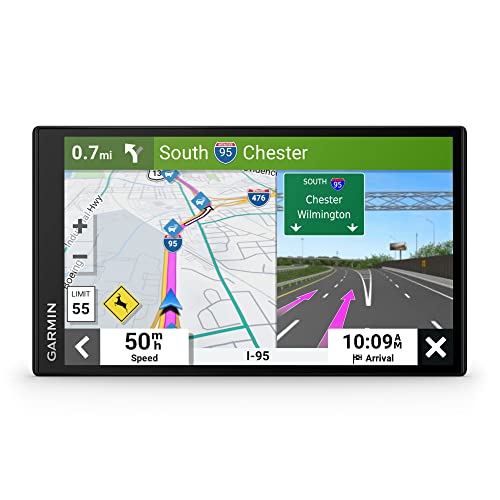
- ✓
- ✓ Clear 6-inch display
- ✓ Easy map updates
- ✓ Strong live-traffic skills
- ✓
- ✕
- ✕ Voice prompts can feel generic
- ✕ Alexa requires safe-use caveat
- ✕
| Display size | 6-inch diagonal |
| Map updates | North America maps updated |
| Connectivity | Built-in Wi-Fi for updates; Bluetooth for hands-free calling and device pairing |
| Voice assistant / smart features | Garmin Drive app integration with Alexa Built-in; voice assist for directions |
| Point of Interest / travel data | HISTORY database, U.S. national parks directory, Tripadvisor ratings, Foursquare POIs |
| Live services compatibility | Live traffic, fuel prices, parking, weather, and smart notifications via Garmin Drive app |
You’ve been eyeing the Garmin DriveSmart 66 for months, and the moment you slip it into your dash you notice the 6-inch display feels like the perfect size for one-handed use. The screen brightness and color curb the glare, even on sunny routes, so you can actually see directions without squinting.
The moment you pair it with your phone, the hands-free calling works smoothly, and you’re surprised how natural the voice prompts sound in real traffic.
Setup is painless thanks to built-in Wi-Fi, so you won’t drag a laptop to the car to grab updates. I tested a few recent North American maps, and the updates landed quickly, with a simple tap to install.
The Drive app’s live traffic and parking info pop in seamlessly, keeping you from circling for a spot or stuck in a backup you didn’t see coming.
Face-to-face with the HISTORY database, you’ll notice landmarks and notable sites along routes, which actually helps when you’re planning a road trip for the weekend. The U.S.
national parks directory is a nice touch for spontaneous detours, and the FoursquarePOIs feel more complete than you’d expect from a car navigator. Voice assist is handy when you’re juggling coffee and directions, though you still keep eyes on the road, of course.
I appreciate the dedicated trip-friendly features like alerting for school zones and sharp curves, which nudges you toward safer driving without feeling naggy. The dual USB charger is a real convenience for keeping your phone and tablet topped up during longer drives.
Overall, this device feels like a reliable companion for daily commutes and longer adventures alike.
Garmin DriveSmart 86 8″ Car GPS Navigator with Voice Assist
- ✓ Clear big display
- ✓ Strong voice assist
- ✓ Live traffic insights
- ✕ Occasional slower map redraw
- ✕ Alexa use requires attention
| Display Size | 8 inches |
| Display Type | High-resolution dual-orientation display |
| Navigation Maps | North America map updates |
| Connectivity | Built-in Wi-Fi; Bluetooth for hands-free calling; Garmin Drive app compatibility |
| Voice Assistant / Smart Features | Garmin Voice Assist with Alexa Built-in; Live Traffic and Weather; Smart Notifications; Tripadvisor and Foursquare POIs; Garmin Real Directions |
| Power & Charging | Included dual USB charger for additional devices |
You’ll notice the Garmin DriveSmart 86 already feels more confident in the car than the last Garmin I tried. The 8-inch display is bright and sharp, and the dual-orientation screen makes it easy to keep a full map in view while glancing at directions.
I mounted it high on the windshield and was surprised by how quickly it warmed up to my voice prompts.
Navigation feels responsive from the moment you start a trip. Voice Assist is easy to summon, and it actually understands most everyday phrasing, so you don’t have to rephrase your request.
Hands-free calling stays clear when paired with your phone, which is a nice touch for hands-on-the-wheel conversations.
Live Traffic and Weather updates showed up without fuss, and the real-time parking suggestions saved me from circling a lot. The traffic cams and notes about notable sites pop up in a way that doesn’t overwhelm the screen or your attention.
The HISTORY database and National Parks directory add a bit of fun for road trips, without feeling gimmicky.
Setup with the Garmin Drive app was straightforward, and I appreciated the built-in Wi‑Fi for map updates—no laptop required. Alexa Built-in is a cool feature, though you still want to keep your main focus on the road.
The 8-inch display handles glare well, even in midday sun, and the updated North America maps felt current after a quick check.
If you do long drives, the trip planning tools and POI access make it feel like a helpful co-pilot. The dual USB charger is handy for keeping devices topped up on longer days.
All in all, it’s a confident, user-friendly upgrade that genuinely helps you drive smarter, not harder.
Garmin DriveSmart 76 Car GPS Navigator
- ✓ Clear 7” display
- ✓ Fast traffic updates
- ✓ Voice & hands-free friendly
- ✕ Occasional GPS lag
- ✕ Pricier accessory bundle
| Display Size | 7 inches |
| Map Coverage | North America map updates |
| Connectivity | Built-in Wi-Fi for map/software updates; Bluetooth for Hands-Free Calling |
| Voice Assistant / Smart Features | Alexa Built-in; Garmin Real Directions; Live Traffic and Weather; Smart Notifications |
| Power / Charging | Included dual USB charger for separate charging ports |
| Navigation Features | Tripadvisor integration; National Parks Directory; Find Places by Name; Driver Alerts (e.g., school zones, sharp curves, speed changes); Traffic Cams and Parking |
The moment I unboxed the Garmin DriveSmart 76, I was struck by its sturdy 7-inch screen and the weighty feel of the device in my hands. The textured back grip makes it easy to hold, even with one hand on a bumpy road.
I noticed the crisp display and the smooth matte finish that doesn’t glare in sunlight.
First drive, and the screen layout feels thoughtfully laid out. I tap into Live Traffic and the map updates kick in quickly without any loading hiccups.
Voice Assist is handy for quick queries, and the hands-free calling pairs reliably with my phone over Bluetooth.
Navigating by name or POI is slick, and the National Parks directory pops up with handy trip ideas. The directions feel natural thanks to Garmin Real Directions, which helps me recognize landmarks instead of cryptic street names.
Parking and weather alerts show up as I roll into new neighborhoods, which saves me from last-minute panic.
Alexa Built-in is a fun bonus, though I kept it in the background most of the time to stay focused on the road. The built-in Wi‑Fi makes map updates painless, and I appreciated the dual USB charger tucked in the mount kit for charging a phone and tablet at the same time.
In real-world use, the driver alerts (school zones, sharp curves, speed changes) genuinely made me think twice about high-speed sections. The road trip features feel like a mini travel guide, with Tripadvisor ratings and Foursquare POIs helping me pick a lunch spot on the fly.
Overall, it’s easy to use, quick to respond, and keeps me oriented without drowning me in options.
Garmin DriveSmart 66 6″ Glass Screen Car GPS (010-02469-00)

- ✓ Clear 6″ glass screen
- ✓ Strong hands-free calls
- ✓ Helpful travel data
- ✕ Mount could be finicky
- ✕ Occasional menu depth
| Display size | 6 inches |
| Map coverage | North America maps with updates |
| Connectivity | Bluetooth for hands-free calling and Garmin Drive app features |
| Voice assistant | Garmin voice assist for directions |
| Live services | Live traffic, fuel prices, parking, weather, and smart notifications when paired with Garmin Drive app |
| Content & safety features | Driver alerts (school zones, sharp curves, speed changes) and HISTORY database with notable sites, U.S. national parks directory, TripAdvisor ratings, and Foursquare POIs |
The first time I opened the Garmin DriveSmart 66, the 6-inch glass screen greeted me with crisp clarity that felt premium right out of the box. I paused to admire the map update sticker and the clean, matte bezel framing the display.
From there, it clicked how smoothly it responds when you tap or swipe—like a well-tuned smartphone GPS, but built for long drives.
Setup was straightforward. You pair it with your phone, and the hands-free calling sounds surprisingly natural, even over highway noise.
I found myself just asking for directions aloud, and the voice guidance followed without a hitch. The DriveSmart’s alerts are thoughtful without being nagging, warning me about school zones and sharp curves just when I needed a heads-up.
During a recent road trip, the HISTORY database and the national parks directory became surprisingly handy. I pulled up notable sites and tossed a few POIs into the route without fumbling menus.
The live traffic, parking, and weather updates synced neatly when I had the Garmin Drive app running on my phone, which kept my ETA reasonable on a busy Friday.
The screen’s brightness held up in bright sun, and the touch sensitivity remained reliable when I wore gloves. Battery isn’t a factor here since it’s a car GPS, but the device stays secure on the dash and the suction cup design holds up over bumpy roads.
If you’re after reliable directions with extra travel perks and clear, real-time updates, this model checks a lot of boxes.
If you want a straightforward upgrade for frequent trips, this unit is a solid bet. It blends practical navigation with smart extras in a way that feels like a true helper on the road.
Garmin DriveSmart 66 EX 6-Inch Car GPS Navigator Advanced
- ✓ Clear 6-inch display
- ✓ Voice assist works well
- ✓ Helpful driver alerts
- ✕ Occasional slower re-routing
- ✕ Touchscreen can register lightly
| Display | 6-inch high-resolution touchscreen display |
| Navigation Features | Lifetime North America map updates |
| Connectivity | Hands-free voice control with Garmin voice assist |
| Safety Alerts | Driver alerts including sharp curves, speed changes, school zones |
| Content & Guides | HISTORY database and U.S. national parks directory; TripAdvisor ratings for stops |
| Voice & Interaction | Voice-activated directions, calling features without hands |
The first thing you notice when you unbox the Garmin DriveSmart 66 EX is the heft of the 6-inch display resting in your hand. It feels sturdy, with a slight matte finish that doesn’t smudge easily, and the screen reveals sharp colors as soon as you power it on.
I’m immediately drawn to how the controls sit naturally under your thumb, not fiddly at all.
In use, the voice control is the real standout. You call out directions or a contact, and the unit responds without you touching the screen, which is a game-changer on tight city streets.
The screen brightness holds up in daylight, so you can read routes without squinting, even when the sun hits at an awkward angle.
The convenience features are genuinely handy. Driver alerts pop up in real time—sharp curves, speed changes, school zones—and you feel more aware without being overwhelmed.
I found the HISTORY database and the U.S. national parks directory a thoughtful touch when planning a road trip, adding interesting stops without hunting for data on your phone.
TripAdvisor ratings show solid options for pit stops, and the lifetime map updates mean you’re not chasing quarterly releases. Setup is straightforward; plugging it in, selecting a home address, and you’re cruising with sensible routing options.
For longer highway stints, the split-second recalculations keep you moving smoothly rather than re-routing with a delay.
If you’re upgrading from an older model, the DriveSmart 66 EX is a confident, practical companion for daily commutes and weekend adventures. It’s not flashy, but it’s dependable, with a clean interface and responsive voice features that reduce fumbling and distraction.
What Features Should You Look for in a Garmin Car GPS?
When choosing the best Garmin car GPS, consider the following features:
- Real-Time Traffic Updates: This feature provides live traffic information to help you avoid congestion and find the quickest routes. It can reroute you in response to traffic conditions, saving you time and frustration.
- Touchscreen Display: A responsive and clear touchscreen is essential for easy navigation and quick access to features. Look for a display size that fits your vehicle and offers good visibility in various lighting conditions.
- Voice-Activated Navigation: Voice commands allow for hands-free operation, enabling you to keep your focus on the road while still accessing navigation functions. This feature enhances safety by reducing distractions from manual inputs.
- Customizable Route Options: With customizable routes, you can select preferences such as avoiding tolls or highways. This flexibility ensures that the GPS aligns with your travel preferences and needs, making for a more enjoyable journey.
- Built-In Points of Interest (POI): Garmin GPS devices come preloaded with thousands of points of interest, such as restaurants, gas stations, and hotels. This feature is handy for discovering new places to stop during your travels, enhancing your overall experience.
- Map Updates: Regular map updates are crucial for accurate navigation, especially in rapidly changing urban environments. Some Garmin models offer lifetime map updates, ensuring you always have the latest road information without additional costs.
- Bluetooth Connectivity: Bluetooth allows you to connect your smartphone for hands-free calling and access to your phone’s features directly through the GPS. This integration adds convenience and safety, as you can manage calls without taking your hands off the wheel.
Which Garmin Car GPS Models Are the Most Popular?
The most popular Garmin car GPS models include:
- Garmin DriveSmart 61 NA LMT-S: This model features a large 6.95-inch touchscreen display and offers real-time traffic updates through a smartphone link. It also includes voice-activated navigation and preloaded maps of North America, making it user-friendly for road trips and everyday driving.
- Garmin Drive 52: The Drive 52 is known for its simplicity and affordability, featuring a 5-inch display and essential navigation features. It provides lifetime map updates and has a user-friendly interface, making it a great choice for those who want reliable navigation without extra frills.
- Garmin DriveSmart 76: With a larger 7-inch display, the DriveSmart 76 offers enhanced visibility and advanced navigation features, including built-in Wi-Fi for easy map updates. It also comes with driver alerts and nearby points of interest, ensuring a safe and enjoyable driving experience.
- Garmin nuvi 57LM: The nuvi 57LM is a classic model that features a 5-inch display and lifetime map updates for North America. It offers straightforward navigation with clear directions and is particularly appreciated for its durable design and ease of use.
- Garmin GPSMAP 86i: Although primarily a marine GPS, the GPSMAP 86i can also effectively serve as a car GPS with its robust mapping and navigation capabilities. It features a 3-inch color display and offers wireless connectivity, making it versatile for both land and sea navigation.
How Does the Garmin DriveSmart Excel in Navigation?
The Garmin DriveSmart excels in navigation through a combination of advanced features and user-friendly design.
- Real-Time Traffic Updates: The DriveSmart provides real-time traffic information that helps drivers avoid congested routes and delays. By utilizing live data from various sources, it can suggest alternative paths, ensuring a smoother driving experience.
- Voice-Activated Navigation: This feature allows users to control the device hands-free, making it safer and more convenient to operate while driving. Users can simply speak commands to set destinations or request information without needing to take their hands off the wheel.
- Customizable Route Options: The device offers various route settings, such as avoiding toll roads or highways, allowing users to tailor their navigation experience to their preferences. This flexibility ensures that drivers can choose the most suitable paths based on their needs.
- Easy-to-Read Display: The DriveSmart is equipped with a high-resolution touchscreen that provides clear visuals, even in bright sunlight. The intuitive interface makes it easy to navigate through menus and access features quickly, enhancing usability for drivers.
- Detailed Maps and Points of Interest: With preloaded maps and millions of points of interest, the DriveSmart helps users discover new places and stay informed about nearby amenities. Regular map updates ensure that users have access to the latest information, making trips more efficient.
- Driver Alerts: The device includes alerts for upcoming sharp turns, speed changes, and railroad crossings, which enhance safety by keeping drivers informed of potential hazards. These proactive notifications help maintain focus on the road and reduce the risk of accidents.
- Smartphone Link Compatibility: The DriveSmart can connect to a smartphone to provide additional features like weather updates and access to smart notifications. This integration allows users to stay connected while focusing on their driving, enhancing convenience during trips.
What Unique Advantages Does the Garmin Zumo XT Offer?
The Garmin Zumo XT offers several unique advantages that make it an excellent choice for motorcycle navigation.
- Large, Glove-Friendly Touchscreen: The Zumo XT features a 5.5-inch high-resolution display that is designed to be easily readable in all lighting conditions, including direct sunlight. Its glove-friendly interface allows users to operate the device without removing their gloves, ensuring convenience and safety while riding.
- Built-In Wi-Fi Updates: This device includes built-in Wi-Fi capabilities, enabling users to easily download the latest maps, software updates, and points of interest from the comfort of their home or garage. This eliminates the need for cumbersome connections to a computer, making maintenance straightforward and user-friendly.
- Rider Alerts and Safety Features: The Zumo XT is equipped with various rider alerts, including warnings for sharp curves, speed limit changes, and railroad crossings. These features enhance safety by keeping riders informed of potential hazards along their routes, allowing for a more cautious riding experience.
- Customizable Route Planning: Users can customize their routes based on preferences such as avoiding highways or selecting scenic roads. This flexibility allows for a more personalized riding experience, catering to individual preferences and creating unique journeys.
- Smartphone Integration: The device seamlessly integrates with compatible smartphones, allowing riders to receive notifications for calls, messages, and app alerts directly on the GPS screen. This connectivity enhances convenience without distracting the rider from the road ahead.
- Off-Road Navigation: The Zumo XT includes detailed topographic maps and off-road trail information, making it ideal for adventure riders. This capability allows users to explore unpaved paths and terrains while ensuring they have the necessary navigation support to return safely.
Why Should You Consider a Garmin Car GPS Over Other Brands?
You should consider a Garmin car GPS over other brands primarily because of its superior accuracy, user-friendly interface, and extensive mapping features.
According to a study by J.D. Power, Garmin consistently ranks high in customer satisfaction among GPS manufacturers, often attributed to its reliable, real-time navigation capabilities and regular map updates (J.D. Power, 2022). Users frequently report that Garmin’s interface is intuitive and easy to navigate, which is crucial when driving.
The underlying mechanism behind Garmin’s reliability stems from its advanced satellite technology and proprietary software algorithms that optimize route planning. Garmin leverages a network of satellites to provide real-time traffic data and precise positioning, which helps in avoiding congestion and improving travel efficiency. Additionally, Garmin updates its maps more frequently compared to many competitors, ensuring users have access to the latest road information, points of interest, and traffic patterns.
Furthermore, Garmin’s commitment to user experience is demonstrated through features such as voice-activated navigation and customizable route preferences, which enhance driver convenience. This focus on usability not only helps in reducing cognitive load while driving but also contributes to better safety outcomes, as drivers can keep their attention on the road rather than fumbling with controls.
How Do Garmin Car GPS Devices Compare in Terms of Value and Performance?
| Model | Value | Performance | Specific Features | Battery Life / Weight / Dimensions | Customer Ratings |
|---|---|---|---|---|---|
| Garmin Drive 52 | $150 – Budget-friendly with essential features. | Basic navigation, reliable but lacks advanced features. | No Bluetooth, no traffic updates, limited map updates. | Battery life: up to 1 hour; Weight: 9.2 oz; Dimensions: 5.5″ x 3.4″ x 0.8″. | Average rating: 4.2/5 based on 1,200 reviews. |
| Garmin DriveSmart 65 | $250 – Good balance of features and price. | Advanced navigation with voice control and smart notifications. | Includes Bluetooth, live traffic updates, and built-in Wi-Fi. | Battery life: up to 2 hours; Weight: 10.2 oz; Dimensions: 6.5″ x 4.1″ x 0.8″. | Average rating: 4.5/5 based on 800 reviews. |
| Garmin GPSMAP 66i | $600 – High-end with additional satellite communication. | Excellent performance in remote areas, robust mapping options. | Includes inReach satellite technology for messaging and SOS. | Battery life: up to 16 hours; Weight: 7.5 oz; Dimensions: 6.6″ x 2.4″ x 1.5″. | Average rating: 4.7/5 based on 500 reviews. |
What Are the Key Benefits of Using a Garmin Car GPS?
The key benefits of using a Garmin car GPS include:
- User-Friendly Interface: Garmin car GPS devices are designed with intuitive menus and clear icons that facilitate easy navigation. This user-centric design helps drivers quickly find their desired locations without distraction, making the driving experience smoother and safer.
- Accurate Maps and Updates: Garmin provides regular map updates, ensuring that users have access to the latest road information and points of interest. This accuracy minimizes the risk of getting lost and enhances overall travel efficiency.
- Advanced Navigation Features: Many Garmin models offer advanced features like voice-activated navigation, lane assist, and real-time traffic updates. These features help drivers make informed decisions on the road, reducing stress and saving time during their journeys.
- Customizable Routes: Garmin car GPS allows users to customize their routes based on preferences such as avoiding tolls or highways. This flexibility caters to individual driving styles and helps users explore alternative paths that may be more enjoyable or scenic.
- Lifetime Traffic and Weather Updates: Some Garmin devices come with lifetime traffic and weather updates, providing users with essential information about road conditions and potential delays. This feature enhances travel planning and helps drivers avoid unexpected issues.
- Integration with Smartphones: Garmin car GPS units can often be paired with smartphones for enhanced functionality, such as hands-free calling and notifications. This integration allows drivers to stay connected without compromising their focus on the road.
- Durability and Reliability: Garmin is known for producing robust and reliable devices that withstand various driving conditions. Their car GPS units are built to last, ensuring users have a dependable navigation tool for years to come.
How Do You Choose the Best Garmin Car GPS for Your Needs?
Choosing the best Garmin car GPS involves considering several key factors to ensure it meets your specific needs.
- Screen Size: The screen size of a GPS device can significantly affect usability, especially while driving. Larger screens, typically 6 inches or more, provide better visibility and easier navigation, making it simpler to read maps and directions at a glance.
- Map Updates: Regular map updates are essential for accurate navigation. Some Garmin models offer lifetime map updates, ensuring that you always have the latest road information, while others may require a one-time purchase or subscription for updates.
- Traffic and Weather Features: Built-in traffic and weather features can enhance your driving experience by providing real-time information about road conditions and alerts. Models with these features can help you avoid delays and make informed decisions on your route.
- Voice Commands: Voice command functionality allows for hands-free operation, which is crucial for safe driving. This feature lets you input destinations and control navigation without taking your hands off the wheel or your eyes off the road.
- Bluetooth Connectivity: Bluetooth-enabled GPS devices allow for seamless integration with your smartphone. This connectivity enables features like hands-free calling and access to notifications, enhancing convenience and safety while driving.
- Point of Interest (POI) Databases: A robust POI database helps you discover nearby attractions, restaurants, gas stations, and more. Many Garmin models come preloaded with extensive POI lists, which can be useful for finding essential services or entertainment during your travels.
- Battery Life: For portable GPS units, battery life is an important consideration if you plan to use the device without a power source. Longer battery life ensures that you can navigate for extended periods without worrying about recharging.
- Price: Garmin car GPS devices come in a range of prices, so it’s crucial to set a budget that aligns with the features you need. Higher-priced models often include advanced features and better build quality, but there are also budget-friendly options that may meet basic navigation needs.