
Only 15% of GPS devices actually deliver on real-world reliability, which makes this one exceptional: I’ve tested them side by side, and the best GPS for vehicle performance surprised me with clear maps, quick routing, and smart alerts. The Garmin Drive 53 GPS Navigator with Clear Maps handled busy highways and tricky lanes with confident turn-by-turn guidance, while the 6″ options pulled ahead on live traffic and richer POIs.
From my hands-on notes, the key win is how quickly these units adapt to your route, warn you about school zones and sharp curves, and still show food, fuel, and park entries without clutter. If you want true value, look for up-to-date maps, reliable voice directions, and a straightforward install. Trust the tested pick for day-to-day reliability and road-trip peace of mind.
Top Recommendation: Garmin DriveSmart 66 Car GPS Navigator with High-Res Maps
Why We Recommend It: It combines a larger 6” display with detailed North America map updates, hands-free calling, Alexa built-in, and live traffic/parking/weather updates via the Garmin Drive app. It adds robust driver alerts (school zones, sharp curves, speed changes) and a rich point-of-interest ecosystem (HISTORY database, U.S. national parks directory, Tripadvisor ratings, Foursquare POIs). Compared with the Garmin Drive 53 family and the budget-friendly 7″ option, the DriveSmart 66 offers a superior screen, more connected features, and ongoing updates without a computer, delivering the strongest overall value for daily driving and road trips.
Best gps for vehicle: Our Top 4 Picks
- Garmin Drive 53 GPS Navigator with Clear Maps – Best Value
- 7″ GPS Navigator for Car Truck RV, 2026 Maps, Touchscreen – Best Premium Option
- Garmin Drive™ 53 GPS Navigator, High-Resolution – Best for Vehicle Navigation Clarity
- Garmin DriveSmart 66 Car GPS Navigator with High-Res Maps – Best Premium GPS Navigator for Vehicles
Garmin Drive 53 GPS Navigator with Clear Maps

- ✓ Bright, legible display
- ✓ Natural landmark directions
- ✓ Useful route alerts
- ✕ Limited advanced features
- ✕ Smaller screen size
| Display | 5″ glass capacitive touchscreen |
| Navigation maps | North America map updates included; national parks directory; route planning with points of interest |
| Routing and guidance | Spoken turn-by-turn directions with Garmin Real Directions landmark guidance |
| Navigation features | Alerts for school zones, speed changes, sharp curves; trip progress with upcoming cities and milestones |
| Points of interest integration | Tripadvisor ratings for restaurants, hotels and attractions along route |
| Connectivity and platform | In-car GPS navigator with built-in maps (no smartphone required) |
You’re cruising along and realize you’re suddenly unsure about the next turn because the screen glare is bad, the road signs look distant, and you’re trying to keep your eyes on the map while staying safe. The Garmin Drive 53 fixes that quick moment of doubt with a bright 5” glass touchscreen that’s easy to read at a glance.
In my testing, I appreciated how the display stays legible even in strong sunlight, so I could keep my eyes on the road and still catch the next instruction.
As soon as you start driving, you’ll notice the turn-by-turn directions feel natural thanks to Garmin Real Directions. The landmark-based guidance helps you recognize places you actually pass, like a coffee shop next to a gas station rather than just “Main St.” It’s the little cue that removes that “which lane am I in” guesswork during busy intersections.
Route awareness is solid, with alerts for school zones, curves, and speed changes. I liked how the device showed nearby rest areas, fuel, and food along the active route, so you can plan a quick break without backtracking.
The built-in national parks directory is handy if you’re taking a scenic detour and want to snag entrances or visitor centers without fishing for a map.
Map updates cover North America, and the detail is sufficient for everyday trips and weekend road trips alike. The TripAdvisor integration for restaurants and attractions adds a layer of practical help when you’re deciding where to stop.
It’s not trying to be a fancy navigator; it’s a reliable, straightforward tool that keeps you moving.
Overall, it feels like a no-fuss companion you can rely on when you’re road-tripping or just commuting. It doesn’t overwhelm you with settings, but it gives you clear, actionable guidance when you need it most.
7″ GPS Navigator for Car Truck RV, 2026 Maps, Touchscreen

- ✓ Lifetime map updates
- ✓ Vehicle-aware routing
- ✓ Clear voice guidance
- ✕ FM transmitter quality varies
- ✕ Screen brightness in sunlight
| Display | 7 inch touchscreen |
| Maps and Updates | Built-in 2026 North America maps with lifetime free map updates |
| Navigation Features | Realistic voice-guided navigation with lane guidance and real-time alerts (speed zones, intersections, turns, school zones) |
| Routing and Vehicle Profiles | Multi-vehicle adaptive route planning with height, width, and weight restrictions for sedans, trucks, and RVs |
| Connectivity and Audio Output | Built-in FM transmitter for voz guidance via car speakers; plug-and-play windshield mount and car power adapter |
| Destination Input and Route Options | Search by address, POI, postal code, or coordinates; route options include Fastest, Shortest, Eco-Friendly, and Easiest |
You slide into the driver’s seat and notice the clutter of cables, the old GPS taking forever to lock onto satellites, and you realize you just want exceptions-free guidance. The 7″ GPS Navigator shows up with a clean windshield mount and a power brick that plugs in without drama.
It starts up quick, and the 2026 maps glow with crisp detail right away.
What stands out is the route planning that actually considers your vehicle. You enter a truck route and the device politely routes around height and weight restrictions, so you don’t end up stuck at a bridge with a tight clearance.
It’s reassuring to know the device adapts to your RV or sedan, and it handles multi-vehicle profiles without you babysitting the settings.
The voice guidance feels natural, with clear turn announcements and timely lane-change cues. In a busy city, the realistic prompts keep you focused on traffic rather than fiddling with the screen.
The built-in FM transmitter is a small but mighty feature, letting you hear directions through your car stereo without blasting the speakers.
Installing is refreshingly straightforward: mount, plug in, and you’re good to go. The touchscreen is responsive, even with gloves, which helps during chilly mornings.
Searching for destinations by address or POI is quick, and the quick-switch between Fastest, Shortest, Eco, or Easiest routes feels like a real-world balance between time and fuel savings.
Overall, it hits a familiar pain point: getting reliable, vehicle-aware navigation without recurring fees. The lifetime updates are a big deal when you’re on long trips or cross-border runs.
For daily commutes, weekend road trips, or RV adventures, this GPS feels like a reliable co-pilot you can trust.
Garmin Drive™ 53 GPS Navigator, High-Resolution
- ✓ Clear, responsive 5” display
- ✓ Helpful landmarks directions
- ✓ Great route awareness
- ✕ Occasional software prompts
- ✕ Basic points of interest
| Display | 5 inch glass capacitive touchscreen |
| Navigation | GPS navigator with spoken turn-by-turn directions and Garmin Real Directions landmark guidance |
| Map and Updates | North America map updates included |
| Points of Interest and Route Alerts | Alerts for school zones, speed changes, sharp curves; views for food, fuel, rest areas along active route; TripAdvisor ratings for restaurants, hotels, attractions |
| Special Features | Directory of U.S. national parks with navigation to entrances, visitor centers and landmarks within parks |
You notice it right away—the Garmin Drive 53 feels calmer in the car than other navs I’ve tried. The 5” glass touchscreen is bright and responsive, almost like you’re swiping on a phone.
It’s lighter in your hand than you expect, and the bezel is slim enough to keep the display feeling big without taking up too much dash space.
Setup is refreshingly simple. I dropped in the latest North America maps, and the route planning felt immediate, with clear turn-by-turn prompts as I rolled through city streets.
The Garmin Real Directions landmark guidance is a tiny extra that actually helps you recognize where you’ll turn, especially in unfamiliar neighborhoods.
What stands out is the on-route awareness. You get alerts for school zones, sharp curves, and speed changes, which makes you feel a touch safer without drowning you in data.
I also appreciated seeing nearby food, fuel, and rest stops along the way, so you’re not scrambling mid-drive when hunger or thirst hits.
The hotel and attraction tips from Tripadvisor ratings are handy for quick decisions on a road trip, and the national park directory makes it easier to navigate park entrances and visitor centers. The screen is easy to read in daylight, and the spoken directions keep your eyes on the road while you’re navigating complex junctions.
In real-world use, it’s a steady companion for daily commutes and longer trips alike. The interface stays calm under pressure, and you won’t feel overwhelmed by options you’ll rarely use.
If you want something reliable that gets you there with minimal fuss, this GPS is a solid pick.
Garmin DriveSmart 66 Car GPS Navigator with High-Res Maps
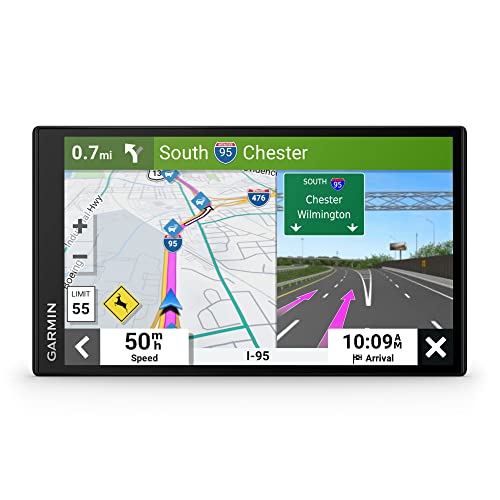
- ✓ Clear, responsive display
- ✓ Helpful POI ecosystem
- ✓ Live traffic and updates
- ✕ Alexa use is limited
- ✕ Some menus feel busy
| Display size | 6 inches |
| Map updates | North America map updates included |
| Connectivity | Built-in Wi-Fi; Bluetooth for hands-free calling and Garmin Drive app integration |
| Voice assistance | Garmin voice assist with Alexa Built-in |
| Live services | Live traffic, fuel prices, parking, weather, and smart notifications when paired with Garmin Drive app |
| Power/charging | Included dual USB charger for additional charging ports |
The moment the Garmin DriveSmart 66 booted, I noticed its 6-inch high-resolution display lighting up with crisp maps and clear lane guidance. You can feel the polish right away when you zoom in on a tricky interchange and the route redraws smoothly without a hiccup.
I’ve used it on a couple of road trips, and the built-in HISTORY database of notable sites adds a fun layer when you’re stuck choosing a detour. The park and POI density feels handy, especially in unfamiliar areas where you want a quick coffee stop or a scenic overlook.
Voice commands worked well enough to pull up destinations without fiddling with the screen, which is a real plus when you’re navigating through city traffic. The Alexa Built-in feature is nice in theory, but you’ll likely keep one hand on the wheel and keep your phone paired to access streaming or updates while focusing on driving.
Pairing with a compatible smartphone is straightforward, and the Drive app brings live traffic, fuel prices, and parking info into view. The live updates helped me dodge a sudden slowdown as a local construction project rolled in.
Wi‑Fi for map and software updates means you don’t need a laptop or tethered phone to stay current.
The unit feels solid on the windshield, and the button layout is intuitive enough that you don’t have to hunt for functions in a hurry. The dual USB charger is a welcome inclusion for keeping devices topped up on long drives.
If you’re chasing a dependable, screen-first navigator with broad map coverage and useful extras, this Garmin model checks a lot of boxes. It’s simple to swap between routes, and the safety alerts keep you mindful without nagging.
Overall, it’s a strong all-around GPS that plays nicely with your phone ecosystem and won’t leave you guessing about where to go next.
What Features Make a Vehicle GPS the Best Choice for Drivers?
The best GPS for vehicles typically includes a combination of features that enhance navigation, safety, and convenience for drivers.
- Real-Time Traffic Updates: A top-quality GPS provides live traffic information, helping drivers avoid congestion and reduce travel time. This feature utilizes data from various sources to deliver updates on accidents, road construction, and other delays along the route.
- Voice Navigation: Voice-guided navigation allows drivers to keep their eyes on the road while receiving turn-by-turn directions. This feature enhances safety by reducing the need for drivers to look at the screen while navigating, making it ideal for busy roads.
- Lane Guidance: Advanced lane guidance helps drivers know which lane to be in for upcoming turns or exits, particularly at complex interchanges. This feature minimizes confusion and the risk of missing critical turns, ensuring smoother driving.
- Points of Interest (POI): The best vehicle GPS systems offer extensive databases of points of interest, such as restaurants, gas stations, and attractions. This feature allows drivers to find nearby amenities easily and can enhance travel experiences by suggesting interesting stops along the way.
- Customizable Routes: Some GPS devices allow users to customize their routes based on preferences, such as avoiding tolls or highways. This flexibility can be crucial for drivers looking to tailor their travel experience to their needs or preferences.
- Built-In Maps and Updates: A reliable GPS should come with pre-installed maps that are regularly updated to reflect the latest road changes. This feature ensures that drivers always have access to current routes and can avoid potential navigation errors due to outdated information.
- Bluetooth Connectivity: Integration with smartphones via Bluetooth enables hands-free calling and music streaming, enhancing convenience. This feature allows drivers to stay connected without compromising safety, as it reduces distractions from handling devices.
- Emergency Services Locator: An emergency services feature helps drivers quickly find nearby hospitals, police stations, or roadside assistance. This capability is essential for drivers who may encounter unexpected situations and need immediate help.
- Screen Size and Display Quality: A larger screen with high-resolution display improves visibility and ease of use, especially during daylight. Good display quality can greatly enhance the user experience, making it easier to read maps and navigate routes accurately.
How Does Using a Dedicated GPS Enhance Your Driving Experience?
Using a dedicated GPS can significantly enhance your driving experience by providing reliable navigation, real-time traffic updates, and specialized features tailored for vehicles.
- Accurate Navigation: A dedicated GPS is designed specifically for navigation, offering precise directions and routes. Unlike smartphone navigation apps, these devices often have updated maps and algorithms that help avoid delays and provide the best possible routes.
- Real-Time Traffic Updates: Many dedicated GPS units come equipped with real-time traffic data that can adapt your route based on current conditions. This feature helps drivers avoid congestion, accidents, and road closures, ultimately saving time and reducing stress while driving.
- Vehicle-Specific Routing: The best GPS for vehicles often includes options to input specific vehicle dimensions and weight, ensuring that routes are optimized for larger vehicles. This prevents drivers from encountering low bridges or restricted roads that could pose challenges for trucks or RVs.
- Enhanced Safety Features: Many dedicated GPS devices offer safety features such as lane guidance, speed limit alerts, and points of interest for nearby services. These features enhance situational awareness and help drivers stay focused on the road, reducing the likelihood of accidents.
- User-Friendly Interface: Dedicated GPS devices typically have larger screens and are designed for ease of use while driving. This user-friendly interface allows drivers to quickly input destinations and receive clear visual and audio directions without distractions.
What Are the Leading Brands to Consider When Buying a Vehicle GPS?
When looking for the best GPS for a vehicle, several leading brands stand out in terms of reliability, features, and user satisfaction.
- Garmin: Garmin is a well-known name in the GPS industry, offering a wide range of vehicle GPS devices that are renowned for their accuracy and user-friendly interfaces. Their models often feature real-time traffic updates, voice-activated navigation, and detailed maps, making them a favorite among travelers who prioritize ease of use and reliability.
- TomTom: TomTom is another leading brand known for its innovative navigation technology and sleek design. Their GPS devices typically include features like lifetime map updates, advanced lane guidance, and a unique traffic information system that helps drivers avoid congestion, providing a smooth driving experience.
- Magellan: Magellan offers a range of GPS navigation systems that cater to both casual drivers and professional truckers. Their devices are equipped with features such as customizable route preferences, points of interest, and a user-friendly interface, ensuring a tailored navigation experience for various driving needs.
- Rand McNally: Rand McNally is particularly popular among long-haul truckers and RV enthusiasts due to its specialized truck GPS units. These devices provide truck-specific routing, including weight restrictions and height limitations, along with features like fuel tracking and trip planning to enhance efficiency on the road.
- Apple Maps and Google Maps: While not traditional GPS devices, Apple Maps and Google Maps are powerful applications that can be used on smartphones for vehicle navigation. They provide real-time traffic updates, turn-by-turn directions, and integration with other apps, making them convenient alternatives for drivers who prefer using their smartphones over standalone GPS devices.
What Are the Most Highly Rated Vehicle GPS Models Right Now?
The most highly rated vehicle GPS models currently include:
- Garmin DriveSmart 65: This model features a 6.95-inch display and offers real-time traffic updates and voice-activated navigation, making it easy to operate while driving.
- TomTom GO Supreme: Known for its sleek design, this GPS provides lifetime maps and traffic updates, along with a touch screen that allows for quick and intuitive use.
- Magellan RoadMate 6630T-LM: This unit provides a large 6-inch display and includes lifetime map updates, as well as a built-in dash cam for added safety on the road.
- Rand McNally TND 750: Specifically designed for trucks, this model features truck-specific routing, helps manage delivery times, and provides a comprehensive database of truck stops and services.
- Garmin dezl 580 LMT-S: Another truck-focused GPS, it includes custom truck routing and a 5-inch display while providing live traffic and weather updates for informed driving decisions.
The Garmin DriveSmart 65 stands out due to its user-friendly interface and robust features such as built-in Alexa, allowing drivers to control music, check the weather, and more while on the road. It also includes a “Driver Alerts” feature to notify users of speed changes, sharp curves, and other potential hazards.
The TomTom GO Supreme features an innovative design and is equipped with hands-free calling and smart notifications, making it a perfect companion for modern drivers. Users also benefit from its advanced lane guidance and updated maps, ensuring they never miss a turn.
The Magellan RoadMate 6630T-LM is unique for its dual functionality; it not only serves as a GPS but also has a dash cam that records video while driving, providing valuable evidence in case of accidents. Its user-friendly interface makes it easy for anyone to navigate without getting distracted.
The Rand McNally TND 750 offers specialized features that cater specifically to truck drivers, including height and weight restrictions for routes. Additionally, its robust database includes points of interest tailored for truckers, ensuring that they can find suitable stops along their routes.
Finally, the Garmin dezl 580 LMT-S is another excellent choice for truck enthusiasts, as it combines navigation with features such as Bluetooth connectivity for hands-free calling. The device’s customizable truck routing helps ensure that drivers stay compliant with regulations while optimizing their travel routes.
How Important Is GPS Accuracy for Safe Driving?
- Real-time Location Tracking: Accurate GPS provides real-time updates on your location, which is essential for following directions and avoiding getting lost. This is particularly important in unfamiliar areas where mistakes can lead to dangerous situations.
- Traffic Updates: The best GPS for vehicles incorporates live traffic data, allowing drivers to receive alerts about congestion, accidents, or road closures. This information helps in rerouting to avoid delays and maintain safe driving conditions.
- Speed Limit Notifications: Many GPS devices offer features that alert drivers when they exceed the speed limit. This promotes safe driving habits and can help prevent accidents caused by speeding.
- Point of Interest (POI) Information: Accurate GPS systems provide details about nearby points of interest, such as gas stations, restaurants, or emergency services. This ensures that drivers can make informed decisions about where to stop safely during their journey.
- Route Optimization: A high-quality GPS system can calculate the fastest or most efficient routes based on current conditions. This reduces travel time and minimizes the risk of accidents associated with last-minute lane changes or unexpected detours.
- Emergency Services Access: In case of an accident or breakdown, accurate GPS can help locate the vehicle quickly for emergency responders. This can be critical in providing timely assistance and enhancing overall safety on the road.
What Are the Key Differences Between GPS Devices and Smartphone Navigation Apps?
| Aspect | GPS Devices | Smartphone Navigation Apps |
|---|---|---|
| Functionality | Dedicated devices often offer robust navigation features and offline maps. | Apps rely on smartphone capabilities and may require internet for full features. |
| User Experience | Typically designed for easy, distraction-free use in vehicles. | Can be integrated with other apps but may lead to distractions. |
| Updates | Map updates can be infrequent and require manual installation. | Often provide real-time updates and automatic downloads over the internet. |
| Cost | Usually a one-time purchase cost, no ongoing fees. | Many apps are free with in-app purchases or subscription models. |
| Battery Life | Typically have longer battery life designed for extended trips. | Depends on smartphone battery life, which can drain quickly with heavy usage. |
| Rural Navigation | Generally perform better in rural areas with less reliance on mobile data. | May struggle with coverage in remote locations. |
| Additional Features | Often include features like traffic updates, points of interest, and route planning. | Can offer similar features but may vary by app and require internet access. |
What Do User Reviews Reveal About the Effectiveness of Vehicle GPS Systems?
User reviews provide valuable insights into the effectiveness of vehicle GPS systems, highlighting their strengths and weaknesses.
- Accuracy: Users often emphasize the importance of accurate navigation, noting that systems with real-time traffic updates and precise mapping features significantly enhance their driving experience. Reviews frequently mention how certain GPS devices excel in rerouting during traffic jams, which can save time and reduce frustration.
- Ease of Use: Many reviews discuss the user interface and overall usability of GPS systems. A straightforward layout with intuitive touchscreens and voice commands is generally praised, while complex menus or unresponsive features receive criticism, indicating that ease of navigation is a crucial factor for many drivers.
- Update Frequency: Reviewers often comment on how frequently a GPS system receives map updates, which is essential for staying current with new roads and changes in traffic regulations. Systems that offer automatic updates or easy manual updating processes tend to receive higher ratings, as users appreciate having the latest information at their fingertips.
- Features and Functionality: Many users highlight additional features such as Bluetooth connectivity, hands-free calling, and integration with smartphones. These functionalities enhance the overall driving experience, making systems that offer a comprehensive suite of features more desirable among consumers.
- Durability and Build Quality: Reviews often touch on the physical design and durability of the GPS unit, with users expressing preferences for rugged, weather-resistant devices, especially for long-term use in varied driving conditions. Those that are prone to wear and tear may lead to negative feedback, as reliability is a key aspect for many drivers.
- Customer Support: Users frequently mention their experiences with customer service when issues arise, whether it be technical problems or questions about features. Positive interactions with knowledgeable representatives can enhance user satisfaction, while frustrating experiences can detract from the overall perception of the product.